Tools
IDML Reference / tools
IDML inspector
Open an .idml file in your browser to see its parts, fonts, links and element names, and render its pages live. Nothing is uploaded.
IntermediateIIhow-to
Drop an IDML package here to see what is inside it. Your file never leaves your browser.
Loading the inspector…
How to read what you see
d6b24016c, .- Summary. The format version comes from the design map. The counts cover spreads, pages,
master spreads, stories, layers, styles and swatches. Fonts lists every family that
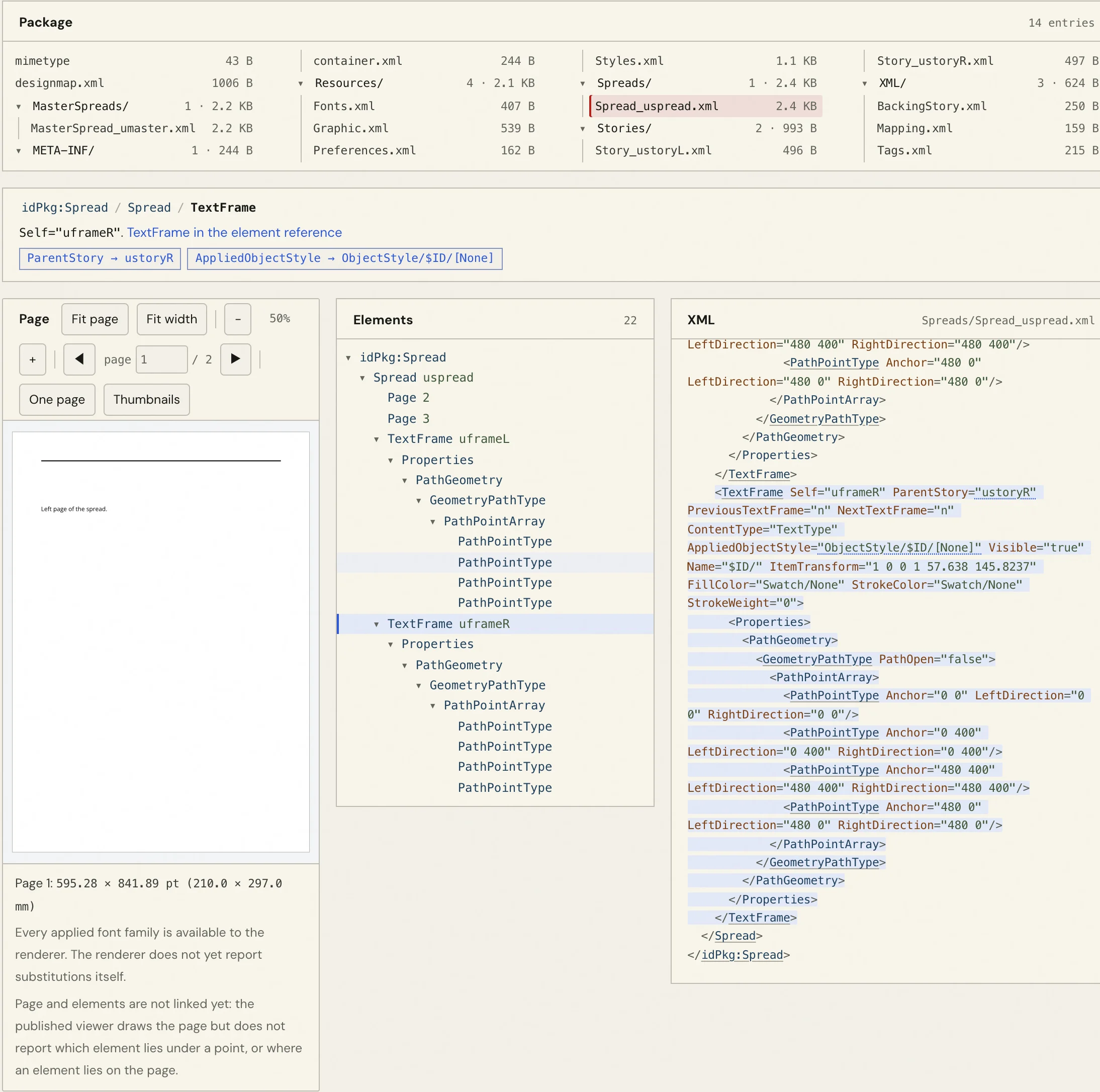
Resources/Fonts.xmldeclares, how often the styles and stories apply it, and whether the package ships the face. Links lists the placed files the document points to and the state it last saw them in. - Package. Every entry in the archive, with its unpacked size. Choose one to open it in the panes beside it. The first spread opens on its own.
- Page. Paged's WebGPU viewer draws the pages. Use the toolbar to fit, zoom and move between pages, or drag and scroll on the canvas.
- Elements and XML. The chosen part's element tree sits beside its source, and the two
follow each other:
- Choose an element in the tree and its whole range is marked in the XML and scrolled into view. Click anywhere in the XML and the tree opens to the innermost element there.
- The strip above them shows the element's path from the part's root, each step selectable, and links the element's name to its entry in the element reference.
- A value underlined in blue is the
Selfid of another element in the package, such as a frame'sParentStoryor a range'sAppliedParagraphStyle. Click it, or its button in the strip, to open the part that defines it with that element chosen. - The tree works from the keyboard: the arrow keys move and open, Home and End jump, and the XML follows each move.
New to the format? Read one by hand walks a package part by part, and package anatomy explains how the parts fit together.
What stays on your machine
The inspector reads the file with your browser's file API and unpacks it in memory. The file and its contents are never sent anywhere. Once you open a file, the inspector fetches only the renderer's code and its fallback font, both from this site. Close the tab and the file is gone.
Limits
- Fonts. The renderer can only draw the faces it has. Faces packed under
Document fonts/are registered. Any other text is set in Open Sans as a stand-in, so line breaks can differ from InDesign's. The renderer does not yet report which fonts it substituted. - Linked images. A linked file lives outside the package, so it cannot render here. The summary lists each link and its state.
- Large files. The renderer parses the document on the page's main thread, so the page pauses briefly while a large document loads. The inspector opens packages up to 300 MB.
- No WebGPU. Browsers without WebGPU still show the summary, the package and every part, but not the render.
- Page and elements are not linked. The viewer that draws the page does not report which element lies under a point, or where an element lies on the page. Until it does, choosing an element does not mark it on the page, and clicking the page does not choose an element. Working the position out from the XML alone would be a guess, so the inspector does not.